

Clean Temporary Files
One of the common causes of Roblox error code 277 is the accumulation of temporary files on your computer. Cleaning these files can help resolve the issue. Follow these steps:
- Press Windows+R
- Type [%TEMP%]
- Press Enter
- Press CTRL+A
- Press Shift+Del
- Press Enter
- Continue to delete all of the files you can
- Restart your PC and open Roblox again

Flush DNS
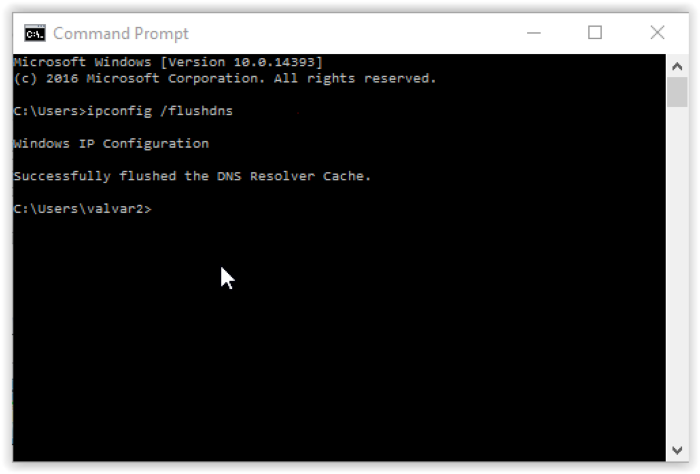
Flushing your DNS cache can also help in resolving the error code 277. To do this, follow these steps:
- Press Windows+R
- Type cmd
- Press Enter
- Type [ipconfig /flushdns]
- Press Enter
You should see a message indicating that the DNS cache has been successfully flushed.
Check and Reset the Internet Connection
A weak or unstable internet connection can cause Roblox error code 277. To fix this, follow these steps:
- Check your internet connection to ensure it is stable.
- Restart your router or modem by unplugging it for a few seconds and then plugging it back in.
- Test your internet connection again by visiting a website or streaming a video.

Reinstall Roblox
Reinstalling Roblox can help resolve the error code 277. Follow these steps to reinstall Roblox:
- Uninstall Roblox from your computer.
- Visit the official Roblox website (www.roblox.com).
- Download and install Roblox.

Update Web Browser
An outdated web browser may cause Roblox error code 277. Update your browser by following these steps:
- Open your web browser.
- Go to the browser’s settings or help menu.
- Check for updates and install them if available.

Delete Log Files
Deleting Roblox log files can help resolve error code 277. Follow these steps to delete the log files:
- Press Windows+R
- Type [%localappdata%\Roblox\logs]
- Press Enter
- Press CTRL+A
- Press Shift+Del
- Press Enter

Run Roblox in Compatibility Mode
Running Roblox in compatibility mode can help fix error code 277. To do this, follow these steps:
- Right-click on the Roblox shortcut or executable file.
- Select Properties.
- Go to the Compatibility tab.
- Check the box next to “Run this program in compatibility mode for:”
- Select the appropriate version of Windows from the dropdown menu.
- Click Apply and then OK.

Use Google DNS
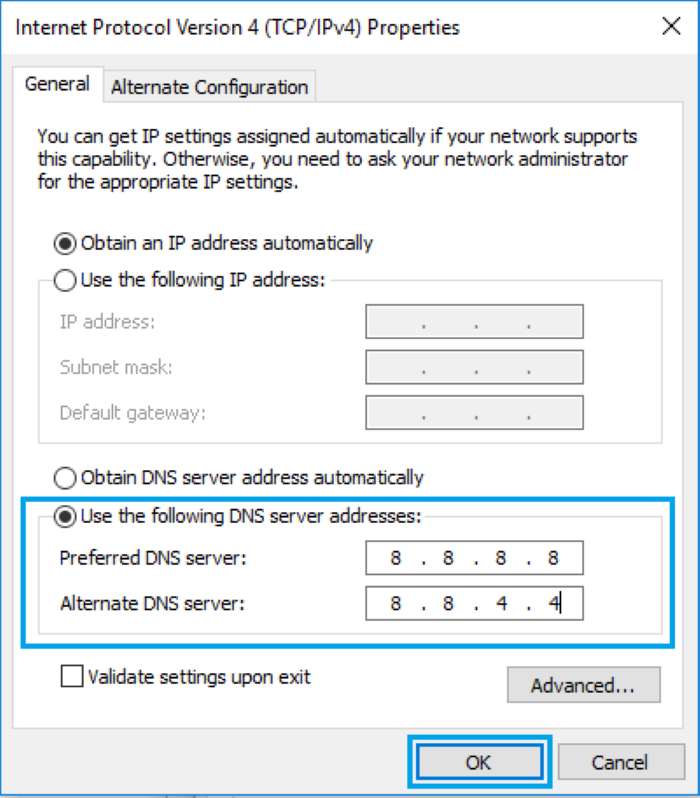
Changing your DNS server to Google DNS can help resolve Roblox error code 277. Follow these steps:
- Open Control Panel.
- Go to Network and Internet > Network and Sharing Center.
- Click on Change adapter settings.
- Right-click on your active network connection and select Properties.
- Select Internet Protocol Version 4 (TCP/IPv4) and click Properties.
- Choose “Use the following DNS server addresses” and enter:
- Preferred DNS server: “8.8.8.8”
- Alternate DNS server: “8.8.4.4”
- Click OK and close the network settings.
Allow Roblox through Windows Firewall
Allowing Roblox through Windows Firewall can help fix error code 277. Follow these steps:
- Open Control Panel.
- Go to System and Security > Windows Defender Firewall.
- Click on “Allow an app or feature through Windows Defender Firewall.”
- Click on Change settings.
- Scroll down the list and find Roblox. Make sure both private and public checkboxes are checked.
- Click OK.

Reddit Solutions
According to a post on Reddit, cleaning the temporary files has worked for some users in resolving Roblox error code 277. Follow the steps mentioned in Solution 1 to clean the temporary files on your computer.

Conclusion
Roblox error code 277 can be frustrating, but with the solutions provided in this guide, you should be able to fix the issue and get back to happy gaming. Remember to try each solution one by one until the error is resolved. Don’t forget to restart your computer after attempting each solution.
